
⚡ 77% OFF Sale Ends In:
01h : 59m : 00s
Upgrade My Excel Skills — $27.99 →
90% OFF · Summer Flash Sale
Master Excel & Unlock High-Value Career Skills
for Just $27.99
Learn practical skills to automate tasks, analyze data, and grow your career.
Preview: What You’ll Learn Inside

10K+
STUDENTS
4.9⭐
RATING
90+
LESSONS
8+
HOURS
Master Excel With Confidence - And Use It in Real Jobs
-
Job-Ready Excel Skills:
Learn Excel the way companies actually use it. -
Save Hours of Manual Work:
Automate repetitive tasks with proven techniques. -
Clear Reports & Dashboards:
Create charts and reports that actually make sense. -
Avoid Costly Excel Mistakes:
Reduce errors, work accurately and avoid Excel errors. -
JOB-READY EXCEL SKILLS:
Learn step by step with practical files and real examples.
7-Day Satisfaction Guarantee • Instant Access
What Students Say After Taking the Course
4.9⭐⭐⭐⭐ •1000+ Reviews
Real Students. Real Skills. Real Results.
Join 10,000+ learners already mastering Excel
What You'll Learn in this Course
Excel Fundamentals
Get comfortable with the interface, navigation, and core basics.
Functions & Shortcuts
Work faster with formulas, named ranges, and keyboard shortcuts.
Formatting & Printing
Prepare clean, print-ready sheets with conditional formatting.
Charts & Visuals
Turn raw numbers into clear, visual charts that tell a story.
Pivot Tables & Dashboards
Summarize huge datasets and build interactive dashboards.
Macros & VBA
Automate repetitive tasks and really speed up your work.
Skill Level:
Beginner to Advanced
Language:
English
Lessons:
91
Lessons:
8 hours and 43 minutes
Materials Included
Hours on-demand videos
Downloadable Resources
Practice exercises
Requirements
No prior Excel knowledge is required. All you need is a computer or laptop with basic computer skills, an internet connection, and the motivation to learn!
6 Reasons Mastering Excel Changes
Your Career
Save time, make smarter decisions, and get noticed for your next raise or promotion.
Boost Productivity
Save hours of work by automating tasks with Excel.
Career Growth
80% of High-Paying Jobs Require Excel - Skills
Personalized Learning
Learn at your own pace with easy-to-follow lessons.
Problem-Solving
Analyze data effectively and make smarter decisions.
Practical Skills
Hands-on exercises to build real-world expertise.
Universal Tool
Excel is essential for business, finance, marketin, etc.
EXCEL MASTERY COURSE
A Simple, Proven Path to Learn Excel with Confidence
The Excel Mastery Course is built from real experience, so you can skip trial & error and start learning
Here's Everything Included
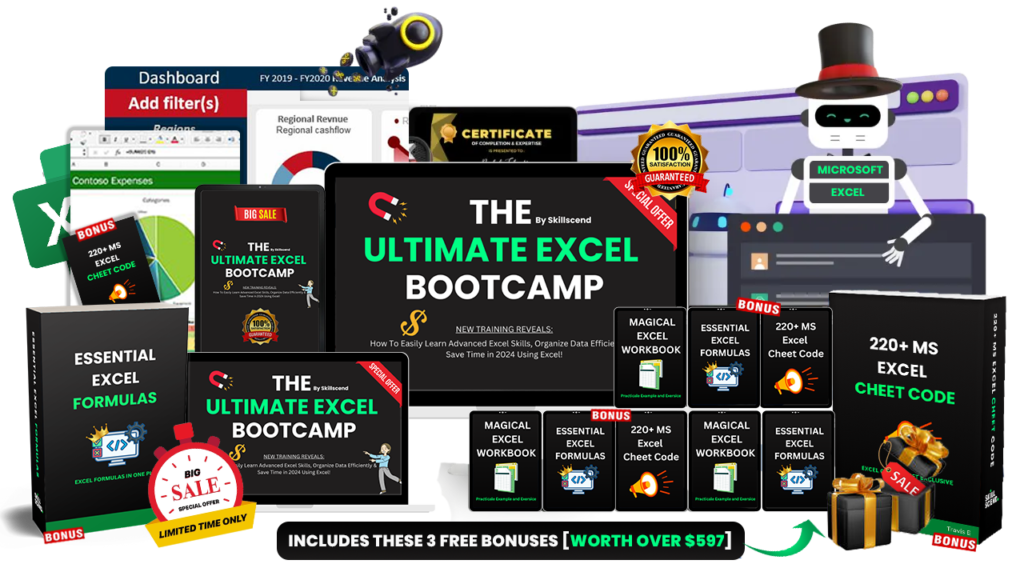
90+ Lessons | 15+ Hands-on Exercises | Comprehensive Curriculum
Get 3 Free Bonus Value at $597
Unlock Exclusive Premium Bonuses
Premium access included free with your enrollment
PREMIUM
01
Magical Excel Workbook
Practical examples and exercises that keep you ahead with the Excel tools.
Premium Bonus — $199 Value, UnlockedPREMIUM
02
220+ MS Excel Cheat Code
Essential cheat codes that streamline your workflow and boost productivity.
Premium Bonus — $199 Value, UnlockedPREMIUM
03
Essential Excel Formulas
Formulas that simplify tasks and accelerate how fast you learn Excel.
Premium Bonus — $199 Value, Unlocked
fx
PREMIUM
01
Magical Excel Workbook
Practical examples and exercises that keep you ahead with the Excel tools.
Bonus - $199 Value, UnlockedPREMIUM
02
220+ MS Excel Cheat Code
Essential cheat codes that streamline your workflow and boost productivity.
Bonus - $199 Value, UnlockedPREMIUM
03
Essential Excel Formulas
Formulas that simplify tasks and accelerate how fast you learn Excel.
Bonus - $199 Value, Unlocked
fx
Total Premium Value
$597 — Unlocked Free
Your Excel Mastery Starts Here
One course, everything included — job-ready Excel skills without the guesswork.
EXCEL MASTERY COURSE
$120
Save 77%
$27.99
/one-time
Access: Lifetime
Includes:
90+ lessons, 15+ hands-on exercises, downloadable resources, and 3 premium bonuses worth $597.
You'll Get Access To:
Job-ready Excel skills
Automation & dashboards
3 premium bonuses ($597 value)
Lifetime access, instant start
7-day money-back guarantee
See full price breakdown ▾
Course value$120
3 premium bonuses$597
Total real value$717
You pay today$27.99
You save$689.01 (96%)
Course Curriculum
14 modules · 90+ lessons · beginner to advanced
View Full Curriculum ▾
MODULE 1
1.1 Introduction
1.2 Overview
MODULE 2
2.1 Hello Excel Part 1
2.2 Hello Excel Part 2
2.3 Data Entry Part 1
2.4 Data Entry Part 2
2.5 Autofill
2.6 Working with Ranges
2.7 Working with Rows and Columns
2.8 Resizing Rows and Columns
2.9 Freezing Rows and Columns
2.10 Working with Multiple Worksheets
2.11 Find and Replace
2.12 Working with Multiple Workbooks
2.13 Intro to Formatting
2.14 Formatting Numbers
2.15 Formatting Dates and Times
2.16 Font Styles
2.17 Text Wrapping and Alignment
2.18 Cell Borders and Merging
2.19 Exercise Excel 101
MODULE 3
3.1 Intro to Filtering
3.2 Advanced Filtering
3.3 Sorting in Excel
3.4 Exercise: Filtering and Sorting Data
MODULE 4
4.1 Intro to Formulas
4.2 Arithmetic Formulas
4.3 Applying Formulas to Text
4.4 Applying Formulas to Dates
4.5 Copying and Cutting Formulas
4.6 Cell References
4.7 Hiding Rows and Columns
4.8 Exercise: Formulas 101
4.9 Budget Project Introduction
4.10 Budget Project Formulas 101
MODULE 5
5.1 Intro to Excel Functions
5.2 Arithmetic Functions
5.3 Counting Functions
5.4 The Status Bar
5.5 Rounding and Truncation
5.6 Median
5.7 Standard Deviation
5.8 Exercise: Crunching Numbers with Excel Functions
5.9 Budget Project: Crunching Numbers with Excel Functions
MODULE 6
6.1 Conditional Calculations I
6.2 Conditional Calculations II
6.3 Conditional Calculations III
6.4 Exercise: Conditional Calculations
6.5 Budget Project: Conditional Calculations
MODULE 7
7.1 Introducing Date and Time Functions
7.2 Parsing Date and Time Components
7.3 The DATE Function
7.4 Applying the DATE and TIME Functions
7.5 DATEDIF and NETWORKDAYS
7.6 Transforming Date Values
7.7 Exercise: Date and Time Functions
7.8 Budget Project: Date and Time Functions
MODULE 8
8.1 LEFT, RIGHT, and MID
8.2 FIND and LEN
8.3 Text Cleaning Functions
8.4 Exercise: Text Functions
8.5 Budget Project: Text Functions
MODULE 9
9.1 The IF Function
9.2 AND and OR
9.3 VLOOKUP
9.4 VLOOKUP with IFERROR
9.5 Exercise: Logical and Lookup Functions
9.6 Budget Project: IF Statements
MODULE 10
10.1 Intro to Modeling
10.2 The PMT Function
10.3 Data Validation Lists
10.4 Scroll Bars
10.5 Named Ranges
10.6 Model Design
10.7 Exercise: Modeling
10.8 Budget Project: Modeling
MODULE 11
11.1 Custom Formats
11.2 Conditional Formatting I
11.3 Conditional Formatting II
11.4 Introducing Charts
11.5 Column Charts
11.6 Line Charts
11.7 Exercise: Data Visualization
11.8 Budget Project: Data Visualization
MODULE 12
12.1 Text to Columns
12.2 External Data
12.3 Table Features
12.4 Tables as Named Ranges
12.5 Exercise: Working with Structured Data in Excel
12.6 Budget Project: Structured Data
MODULE 13
13.1 Intro to Pivot Tables
13.2 Adding Layers to Pivot Tables
13.3 Pivot Table Formatting and Layout
13.4 Filtering Pivot Tables
13.5 Slicers
13.6 Pivot Table Math
13.7 Exercise: Pivot Tables
13.8 Budget Project: Pivot Tables
MODULE 14
14.1 Intro to Macros
14.2 Running Macros with Buttons
14.3 Editing Macros
14.4 Macros – A Case Study
14.5 Exercise: Macros and VBA
14.6 Budget Project: Macros and VBA
BONUSES 15
15.1 Bonus
15.2 Bonus
15.3 Bonus
Click on the Edit Content button to edit/add the content.
Testimonials
Built on Trust. Proven by Results.
Thousands of learners have trusted this course to build real, job-ready Excel skills.
E
Emily Jenkins
Senior Business Analyst
This course completely transformed my workflow. I used to spend hours pulling weekly sales reports, and now I've automated almost the entire process. The pivot table and dynamic dashboard modules alone were worth ten times the price. My VP actually brought it up during my performance review last week!
T
Tyler Brooks
Financial Analyst
Honestly a game-changer. I just graduated from college and was super intimidated by the spreadsheets they use at my new corporate job. This curriculum got me up to speed in two weeks. The practice files mirror actual workplace scenarios rather than just boring, generic math problems.
S
Sarah Miller
Operations Manager
I'm a visual learner, so reading Excel documentation never stuck for me. The step-by-step video breakdowns combined with the downloadable workbooks made retaining complex formulas effortless. I finally figured out XLOOKUP and Power Query. Super solid ROI for my career!
D
David Patel
IT Consultant
The data visualization module alone paid for the whole course. I revamped a clunky quarterly deliverable for a Fortune 500 client into a sleek, automated dashboard. It saves me roughly three hours every Friday. Best investment I've made for my professional development this year, hands down.
Frequently Asked Questions
Absolutely! This course is designed for beginners as well as intermediate users who want to refine their skills and learn advanced Excel techniques.
Unlike random YouTube videos, this course provides a structured and comprehensive learning path, guided exercises, and real-world examples to ensure you master Excel effectively.
The course is built around practical examples and real-world use cases, ensuring you can directly apply what you learn.
Absolutely not! Our goal is to provide immense value at an affordable price to make quality education accessible to everyone. We believe in over-delivering and impressing our students from the start, so when you see the results and impact this course has on your skills and career, you'll trust us for future learning needs.
Plus, by offering such an irresistible price, we aim to make learning Excel a no-brainer decision for anyone looking to upgrade their skills. It's our way of welcoming you to our world and building a long-lasting relationship!
You’ll receive instant access to all course lectures and exclusive bonus content, so you can start learning right away.
We offer a 7-day, no-questions-asked guarantee.
Explore the course, watch the lectures, and review the content at your own pace.
If you feel it’s not the right fit within 7 days of purchase, simply reach out and we’ll take care of the rest.
© 2026 Skillscend – All Rights Reserved